
How to Download and Install IPTV Smarters Pro on PC (Windows & macOS)
Looking to stream your favorite live TV, sports, movies, and shows on your PC? Install IPTV Smarters Pro on PC is the best way to watch IPTV content on both Windows and macOS systems.
In this guide, you’ll learn exactly how to download, install, and set up IPTV Smarters Pro on your computer.
💡 And if you’re searching for a reliable IPTV provider — you’re already in the right place! Buy premium IPTV directly from us at 4K-Live IPTV — we offer the best service and support in the market.
What is IPTV Smarters Pro?
IPTV Smarters Pro is an IPTV player app used to stream live channels, VOD, and series provided by IPTV service providers. It does not host content on its own — you’ll need a subscription (like the ones we offer!) to use it.
System Requirements
Windows:
- OS: Windows 7, 8, 10, or 11
- RAM: 2GB minimum
- Processor: Dual-core
- Disk Space: 5GB
macOS:
- macOS 10.12 (Sierra) or newer
- RAM: 2GB+
- Disk Space: 5GB
- Internet: High-speed broadband for HD/4K
Download IPTV Smarters Pro
Windows Users:
Click the link below to download IPTV Smarters for Windows:
👉 Download for Windows
macOS Users:
Click the link below to download IPTV Smarters for macOS:
👉 Download for macOS
How to Install IPTV Smarters Pro on PC Windows
- Download the
.exefile from the link above - Locate it in your Downloads folder
- Double-click to begin installation
- Click Yes when prompted
- Follow the on-screen setup instructions
- After installation, open the app from the Start Menu
How to Install IPTV Smarters Pro on PC macOS
- Download the
.dmgfile - Open the file to mount it
- Drag the IPTV Smarters icon to your Applications folder
- Open the app
- If prompted, go to:
- System Preferences > Security & Privacy > General
- Click Open Anyway
Setting Up IPTV Smarters Pro
Once installed, follow these steps:
- Open IPTV Smarters Pro

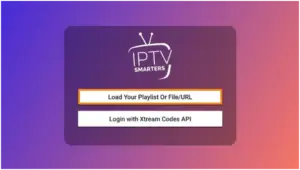
- Click Add New User

- Choose a login method:
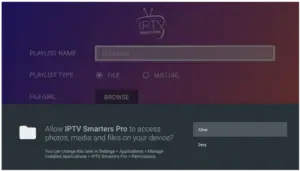
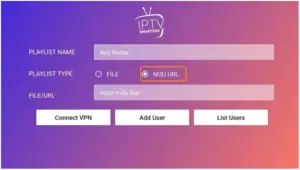
- Load Your Playlist or File/URL (For M3U links)
- Login with Xtream Codes API (Recommended)
For Xtream Codes:
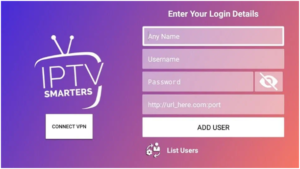
- Username: Provided by your IPTV service
- Password: From your IPTV provider
- Server URL: From your IPTV provider (get it from us!)
Then, click Add User and enjoy!
Features of IPTV Smarters Pro
- 4K/HD live streaming
- Built-in player
- Multi-screen support
- Catch-up TV
- EPG (TV guide)
- Parental control
- External player support
Buy IPTV From Us – 4K Live IPTV
Looking for the best IPTV service?
✅ Over 18,000 channels
✅ Movies, series, and live sports
✅ VOD & Catch-up
✅ Works on all devices (TVs, PC, Android, iPhone, FireStick)
✅ Fast support & setup
🎉 Order your subscription today at 👉 4K-Live IPTV
We guarantee:
- 99.9% uptime
- Instant delivery
- Free test on request
- 4K quality with no buffering
Troubleshooting
Issue: App not opening?
– Reinstall or run as Administrator (Windows)
– Allow via Security Settings (macOS)
Issue: No channels showing?
– Re-check your login details
– Contact your IPTV provider (we’ll help if it’s from us!)
Issue: Buffering?
– Use a wired connection
– Close background apps
– Lower resolution if on slow internet
Conclusion
Installing IPTV Smarters Pro on your PC is simple and powerful — and with the right IPTV provider, it becomes the ultimate viewing experience.
Start watching now by downloading IPTV Smarters Pro and subscribing to 4K-Live IPTV!